IBO Player IPTV: Better Entertainment in France-2026 Guide
You may want a simple way to watch live television, films, and series without adding another large box beside your screen. IBO Player IPTV lets you organise an authorised playlist inside a clean, remote-friendly interface. The media source is provided by your provider and the player sorts channels, VOD categories, favourites and programme information. Your…
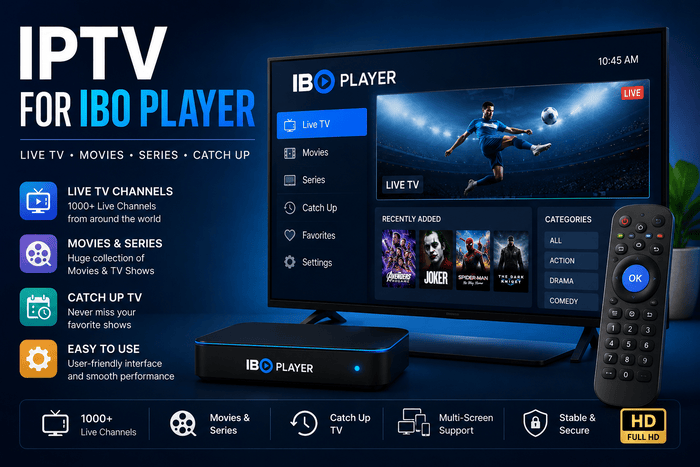
You may want a simple way to watch live television, films, and series without adding another large box beside your screen. IBO Player IPTV lets you organise an authorised playlist inside a clean, remote-friendly interface. The media source is provided by your provider and the player sorts channels, VOD categories, favourites and programme information. Your router then sends each stream to the television. IBO Player is a media player and not a television provider. The official service supports M3U and M3U8 playlists and has a seven day trial after installation. You need a separate IPTV subscription before any channels can appear. Keeping both purchases separate helps you understand which company handles playback and which one manages your content access.
How Does IPTV for IBO Player Work?
Your IPTV provider creates a playlist containing channel and video addresses. IBO Player reads that M3U data and turns it into menus that are easier to use on a large screen. Your Smart TV or streaming device decodes the selected video. The broadband connection links every part of the viewing chain. A problem can begin at any point in that relationship. An overloaded provider server may cause freezing, while weak Wi-Fi can interrupt an otherwise stable stream. An older television may also struggle with demanding video codecs. Good IPTV performance depends on the source, network, player, and hardware working together.
Why Choose IBO Player for IPTV?
IBO Player IPTV suits you when you prefer a television-first experience. You can browse content with a remote instead of handling long links on the screen. Compatible versions also let you manage playlists from a separate web portal using the device details displayed inside the app. That process makes setup easier on televisions with slow on-screen keyboards. The player is available across several major platforms. The official website lists Samsung, LG webOS, Sony, Android TV, Windows, Roku, and Apple TV among supported devices. Availability can still vary by television model, country, and app store. You should check your device before purchasing an activation licence.
Which Devices Support IBO Player?
You can often install IBO Player directly on a compatible Samsung or LG Smart TV. Android TV and Google TV devices provide another practical route, while Roku and Apple TV support depends on the available version. A streaming stick can help when an older television no longer receives new applications. Your screen only needs a working HDMI input for an external device. A missing app does not always mean your television is unsuitable for IPTV. Store availability may change by region or model year. You can connect an Android TV box, Google TV device, or Firestick when the native store lacks IBO Player IPTV. The external device runs the application while your television displays the picture.
| Device | Typical installation route | Best use for you |
| Samsung Smart TV | Samsung Apps or Smart Hub | Direct IPTV viewing without another box |
| LG Smart TV | LG Content Store | Simple webOS setup with a remote |
| Android TV or Google TV | Google Play | Flexible installation and easier updates |
| Fire TV Stick | Compatible store app or approved installation | Useful for older HDMI televisions |
| Roku | Roku channel availability | Basic remote-controlled viewing |
| Apple TV | Apple App Store version | Suitable for an Apple-based home setup |
| Windows or macOS | Official desktop download | Playlist testing and secondary viewing |
IBO Player Activation and Device Details
IBO Player IPTV normally displays identifying details when you open it for the first time. Depending on the version, you may see a MAC ID, Device ID, or Device Key. You enter the requested information on the management page linked by the installed app. The portal then connects your television with the playlist saved under your account. The official IBO Player IPTV service includes a seven-day test period. A player licence becomes necessary when the trial ends, but payment only activates the software. No channels, films, or IPTV package are included with that purchase. Your French IPTV subscription remains a separate service.
How Do You Add an M3U Playlist?
Your provider may send a long M3U URL after activating your account. Open the playlist manager associated with your IBO Player IPTV version and enter the device information shown on the television. Paste in the full playlist address and give it a name that is easily recognised. Restart the app after saving to load the content. An M3U link can have your server address, username and password. Treat the URL as a private account credential. Do not post it in public groups or send screenshots that expose the full address. One missing symbol or accidental space can stop IBO Player from opening your playlist.
Can You Use Xtream Codes With IBO Player?
The standard official IBO Player IPTV service mainly promotes M3U and M3U8 playlist support. There are several IBO Pro apps with similar names that provide Xtream Codes but their features and activation portals may vary. Check the exact developer and website shown inside your installed app. Similar names do not always represent the same product. When your provider sends a server URL, username, and password, ask for the matching M3U link if your version only accepts playlists. The provider can usually generate the full address from those account details. Avoid using unofficial conversion websites because your credentials may be exposed. Provider support remains the safer route.
| Access format | Information required | Suitable situation |
| M3U | One complete playlist URL | Standard IBO Player configuration |
| M3U8 | A compatible streaming playlist | Adaptive video sources |
| Xtream Codes | Server, username, and password | IBO-branded versions supporting Xtream |
| Device portal | Device ID or MAC with Device Key | Remote playlist management |
How Do You Configure the EPG?
An electronic programme guide connects a channel with its programme title, start time, and description. Your provider may include the guide inside the playlist or supply a separate XMLTV address. IBO Player reads that information and places it beside the relevant channel. Accurate channel identifiers allow the guide and playlist to match. A blank EPG does not always mean your subscription has stopped working. The guide source may still be working on updating, or the provider may use channel IDs that don’t align with the playlist. Check the timezone on your television and set it to Europe/Paris if the schedules are an hour early or late. Refresh the EPG before deleting your account.
How Should You Organise a Large Playlist?
A large catalogue can feel impressive during the first login, but daily navigation matters more. You should hide groups you never open and add regular channels to your favourites. Clear category names help you move between French television, international content, films, series, and replay. Search becomes useful when thousands of entries are available.
Your provider controls the original channel structure, while IBO Player displays the supplied groups. A carefully organised playlist loads faster and feels easier to use than a cluttered library. You can ask support to remove unwanted countries or adult categories when account-level filtering is available. Better organisation also reduces accidental access by children.
What Internet Connection Do You Need?
France had 42.4 million premises passed for fibre at the end of December 2025, representing 94.3% coverage. Arcep later reported that 43.5 million premises had access to fixed ultrafast services by 31 March 2026. Broad national coverage supports online video, yet local Wi-Fi quality still varies inside each home. Router placement often matters as much as the advertised broadband package.
A television placed behind several walls may receive a weaker signal than a phone beside the router. Ethernet gives you a stable link when the cable can reach your screen. A 5 GHz network usually performs well over a shorter distance, while 2.4 GHz can travel farther. Household downloads and game updates may also compete with your IPTV stream.
How Do You Reduce Buffering?
Start by testing another channel from a different group. Open a recognised streaming service on the same device and see what happens. When every app stops, it’s your router or internet connection that is probably to blame. When just one channel doesn’t work, it’s probably a problem with the source stream that needs provider attention.
Reboot the television, player and router before making any advanced settings. If a 4K feed keeps freezing, try an HD version. Pause large downloads and connect through Ethernet where possible. Stable Full HD playback usually creates a better experience than unreliable 4K video.
Why Is Your Playlist Not Loading?
An empty library can be caused by expired subscription, wrong M3U URL or mismatched device information. Check the Device Key and MAC ID against the values in the app. Save playlist again and restart IBO Player. Contact your provider if the same link does not work on another compatible player.
Black screen with working menus can be a codec or source problem. Missing programme data points toward the EPG rather than the account itself. A failed app activation concerns the player licence, while rejected channels concern the IPTV provider. Separating each entity helps you reach the correct support team.
IBO Player Compared With Other IPTV Players
IBO Player IPTV often suits Samsung and LG users who want an app installed directly on the television. TiviMate focuses mainly on Android TV and provides deeper guide customisation. IPTV Smarters offers a familiar layout across many platforms. Your device and preferred login method should guide your decision. No media player can guarantee server uptime or add simultaneous connections. The application controls navigation, while the provider controls the account and source. Your broadband transfers the video, and your device handles decoding. Choose a player that complements the other parts rather than expecting it to solve every problem.
| Feature | IBO Player | TiviMate | IPTV Smarters |
| Samsung and LG support | Strong on compatible models | No common native version | Availability varies |
| Android TV support | Available | Main platform | Widely available |
| Standard M3U support | Yes | Yes | Yes |
| Xtream Codes | Version dependent | Yes | Commonly supported |
| Remote-friendly design | Yes | Yes | Yes |
| Best match | Smart TV users | Advanced Android users | Cross-device beginners |
Why French IPTV with IBO Player?
French IPTV suggest IBO Player for devices that are compatible with Samsung, LG, Roku and Android. French-speaking support is also available on the website to help you install. You will receive account details to use to connect to a compatible player once you have activated. The device guidance provided is useful when setting up IBO Player IPTV for the first time. The service advertises more than 15,000 live channels and over 50,000 VOD titles, along with EPG, replay, and HD through 8K options. Those figures are provider claims rather than independent measurements. Use the offered 24-hour trial to check your preferred channels, subtitles, guide accuracy, and evening performance. A real test on your own network gives you more useful evidence than a catalogue total.
Is IBO Player IPTV Legal in France?
IBO Player and IPTV technology are legal media tools. It relies on whether the provider is authorized to distribute the channels, films, series or sporting events in its playlist. Arcom explains that unauthorized streams are available through third-party applications and media players. You have to check the service itself, and not judge legality by the app alone. Arcom warns users to be aware of very low prices, lack of information about the company and access to a lot of premium content without clear rights. Payment does not prove that a catalogue is licensed. Unauthorised services may be blocked and may expose users to security risks. Choose a provider that can explain its terms and content permissions.
Frequently Asked Questions
Does IBO Player Include IPTV Channels?
IBO Player IPTV does not supply channels or subscriptions. You need to add an authorised M3U or M3U8 playlist from a separate provider. The app licence only keeps the media player active after its trial. Your content account and software activation remain separate.
Can You Use IBO Player IPTV on Samsung or LG?
Compatible versions are available on selected Samsung Tizen and LG webOS televisions. Availability depends on the model, year, region, and app store. Search the television store before purchasing a licence. If you’re not seeing the app, try the television store before you buy a licence. An external streaming box can help.
Can You Use One Playlist on Several Devices?
You may install IBO Player IPTV on several compatible screens, but each app can require separate activation. Simultaneous streaming depends on the number of connections included in your IPTV plan. One connection usually supports one active stream at a time. Ask your provider before using the account in several rooms.
Final Verdict
IBO Player IPTV can give you a clean Smart TV experience without complicated daily navigation. Your provider supplies the playlist, IBO Player arranges the catalogue, and the EPG adds programme information. Your router carries the data while the television decodes the chosen stream. Every relationship influences the final picture. Install the correct app version and protect your M3U credentials. Test your IPTV subscription during a normal evening and compare several channels. Use Ethernet where practical and confirm the provider’s content rights. French IPTV offers device guidance and a short trial that can help you evaluate the service at home.