IPTV Smart Player France: Setup, Features and Best Alternatives in 2026
Choosing an IPTV Smart Player France looks simple until you search an app store. You quickly find several apps with similar names, matching icons and almost identical promises. After installation, the differences become obvious. One app may handle a large M3U playlist smoothly, while another may feel slow on your Smart TV or make…
Choosing an IPTV Smart Player France looks simple until you search an app store. You quickly find several apps with similar names, matching icons and almost identical promises. After installation, the differences become obvious. One app may handle a large M3U playlist smoothly, while another may feel slow on your Smart TV or make the electronic programme guide difficult to use.
IPTV Smart Player gives you a straightforward way to organise and play an authorised playlist on a compatible device. You can use it as an M3U player, save favourites and open supported streams without dealing with a complicated interface. Before choosing any IPTV app in France, you should look beyond screenshots and check how well it works on your main screen, how recently it was updated and whether the developer clearly explains what data the app collects.
What Is IPTV Smart Player?
IPTV Smart Player is a media player rather than a television provider. You add your own authorised playlist or supported media link, and the app turns that information into categories, channel names, playback controls and favourites. The Google Play description for the app refers to M3U playlist support, direct video links, casting and multi-device use. The app does not supply a subscription or a catalogue of channels. You can treat the player as the interface between your device and your media source. Your IPTV subscription or authorised service supplies access details, while the player controls how you browse and watch. A polished player cannot repair a broken stream, and a strong source can still feel difficult to use inside a poorly designed app.
Why IPTV Smart Player Matters for Viewers in France
Your viewing habits probably involve more than one screen. You may watch live television on a connected TV, continue a programme on a tablet or use your phone while travelling. Médiamétrie reported an average of 4 hours and 14 minutes of video viewing per person per day in France during 2025. ARCOM also reports that 89% of French households have a television and 84% of those sets are connected to the internet. A reliable IPTV player for Smart TV, Android TV or mobile can make daily viewing easier to manage. A useful player helps you reach content quickly rather than forcing you to scroll through a large, disorganised playlist. Search, favourites, EPG data and clear remote navigation often matter more than decorative features. The player works best for you when you want a simple route from playlist import to playback.
How IPTV Smart Player Works With an M3U Playlist
An M3U playlist is a structured file or web address containing media entries. After you add an M3U URL, the app reads the available names, categories and stream locations. The player may also load logos and EPG information when your source includes compatible data. M3U and M3U8 remain common search terms because many IPTV apps, including competing Smart TV players, support those formats. Playlist quality shapes your experience. Clear categories and accurate programme data make navigation feel smooth, while duplicate entries, broken logos and vague labels create frustration. When one playlist works well and another fails in the same app, the source is often the real cause.
Setting Up IPTV Smart Player on Your Device
Download the player from an official app store whenever a verified version is available for your device. Check the developer name, update date, recent reviews and permissions before installation because unrelated apps may use similar names. After opening the app, add your authorised M3U playlist, M3U8 link or another format supported by the exact version you installed. Give the first import enough time to finish. A large playlist may need several minutes to organise categories, logos and programme information. Once loading ends, save your most-used channels or media entries as favourites and remove categories you never open. A short setup session can save you time every day.
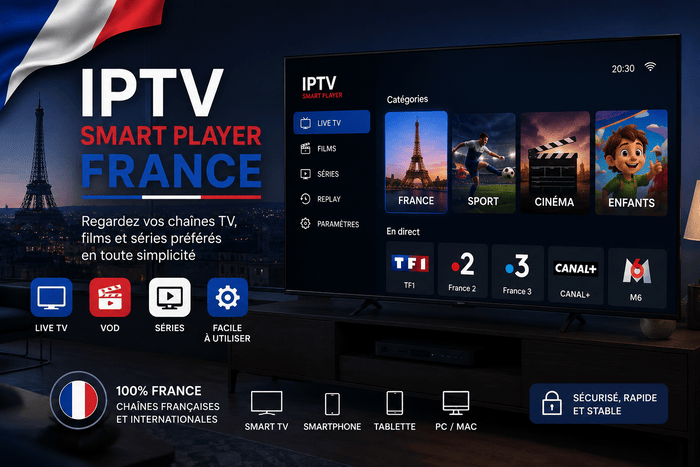
Using IPTV Smart Player on a Smart TV
A Smart TV IPTV player needs more than attractive screenshots. You control the interface from a distance, usually with directional buttons, so menus must remain readable and predictable. A well-designed Smart TV IPTV app can suit you when the layout keeps categories close to the home screen and lets you return to recent content without repeated clicks. Before choosing an IPTV player for Samsung TV, LG TV, Android TV or Google TV, confirm that the app supports your operating system. Samsung and LG use different app ecosystems from Android TV, and app availability can vary by country. An external device such as a Fire TV Stick, Chromecast with Google TV or Android TV box may give you more player choices when your television store offers limited options.
IPTV Smart Player for Android TV and Google TV
Android TV and Google TV give you access to several popular IPTV player apps. A lightweight player remains a practical choice when you prefer a simple interface, but remote control support should influence your decision. Test how quickly you can change categories, open the EPG and return to the previous stream. TiviMate is a major competitor in the Android TV IPTV player market. Its official listing highlights an interface designed for large screens, remote navigation, M3U support, Xtream Codes, Stalker Portal, multiple playlists and a grid-style TV guide. IPTV Smart Player feels lighter, while TiviMate gives you more control over layout and playlist management.
IPTV Smart Player for Firestick
Firestick users often search for the best IPTV player because the device is affordable, portable and easy to connect to almost any television. The app may work well when a compatible version is available through a trusted source, but you should avoid random APK websites and unverified download codes. For a Firestick IPTV player, performance depends on the model, available storage and Wi-Fi signal. Keep enough free space for app updates and cache files, and connect through a stable 5 GHz network when Ethernet is unavailable. A lightweight player can perform better on an older Fire TV device than an app filled with animations and advanced features you never use.
IPTV Smart Player vs TiviMate
Choose the simpler app when you want an easy M3U player with a short learning curve. You can add a playlist, organise favourites and begin watching without spending much time changing menus. The simpler layout may also feel more comfortable for family members who do not want technical settings. Choose TiviMate when you watch mainly on Android TV and want a traditional programme-guide experience. Multiple playlists, deeper EPG controls and large-screen customisation give you more flexibility. TiviMate is not designed for phone touchscreens, so a mobile-friendly IPTV app may serve you better across several device types.
IPTV Smart Player France vs Smarters Player Lite
Smarters Player Lite uses a visual media-library layout and supports M3U and JSON playlists on Apple devices. Its App Store presence makes it a convenient option when you use iPhone, iPad or Apple TV. You may prefer its separate sections for live media, films and series when your playlist contains detailed metadata. The simpler player offers a more direct experience when your priority is opening a playlist quickly. Smarters Player Lite may look more familiar to users of subscription streaming platforms, while a direct playlist interface suits you when fast navigation matters more than posters, cover art and several content screens.
IPTV Smart Player vs Televizo
Televizo gives Android users more playlist-management options without becoming as television-focused as TiviMate. Its official listing mentions multiple playlists, EPG support, catch-up, Chromecast, favourites, search, parental controls and selection of video, audio and subtitle tracks. Those features make Televizo a strong alternative when you want detailed control on both a phone and a television. The simpler option remains easier when you only need the essential controls. You may reach your favourite streams faster because fewer settings stand between the home screen and playback. Televizo becomes more attractive when you manage several M3U playlists or often adjust audio tracks, subtitles and EPG sources.
Features You Should Prioritise
A good IPTV player should help you find content quickly. Search speed, favourite management, clear categories and reliable playback have a bigger effect on daily use than a long feature list. EPG support also matters when you watch live channels because you can check current and upcoming programmes without opening every stream. Hardware decoding, external-player support and subtitle controls can improve compatibility when your playlist contains several video formats. Multiple playlist support becomes useful when you manage separate authorised sources. Recording and catch-up may sound essential, but availability also depends on your source and device storage, not only on the player.
How to Improve IPTV Streaming Quality
Your IPTV streaming setup relies on more than internet speed. Wi-Fi strength, router placement, server load, video bitrate and device performance all influence playback. A fast broadband package cannot prevent buffering when your television receives a weak wireless signal or the media source becomes overloaded. Test the same authorised stream on another device before replacing your player. Try Ethernet where possible, restart your router and close unused apps. You can also compare a lower-resolution stream with a 4K IPTV stream. Smooth HD playback alongside unstable 4K video often points to bandwidth or hardware limits rather than a player fault.
Fixing Playlist and EPG Problems
When an M3U playlist does not load, paste the address again and check for extra spaces, missing characters or an expired link. Avoid typing a long URL manually. When another authorised playlist opens normally in the app, contact the original source because the app is already proving that it can process a valid playlist. A blank EPG usually means that programme data is missing, outdated or incorrectly matched. Refresh the guide and allow enough time for the update to finish. Changing IPTV players may not help when the source supplies no usable EPG data, so verify the programme-feed settings before reinstalling the app.
Fixing Buffering, Freezing and App Crashes
Buffering can begin when your network becomes busy, the source server reaches capacity or your device struggles to decode the stream. Compare several authorised streams and test during different hours. When every app buffers on the same device, focus on the network or hardware rather than the app. For app crashes, clear the cache, restart the device and install available updates. Low storage can also cause instability on Smart TVs and Firestick devices. Remove unused apps instead of repeatedly reinstalling the player without checking the available space.
Is IPTV Smart Player Legal in France?
An IPTV player is legal software. The legal issue depends on where your playlist comes from and whether the service has permission to distribute the content. ARCOM explains that IPTV technology itself is lawful, while access to protected films, channels or sporting events through an unauthorised service can violate French law. You should check the provider behind any playlist added to your player. Look for a real business identity, legal notices, secure payment, clear terms and realistic content claims. Paying for access does not prove that distribution rights exist, and a professional-looking website does not guarantee authorisation.
How to Choose a Reliable IPTV Service
Your IPTV subscription should clearly explain supported apps, device limits, simultaneous connections and technical support. A provider should also tell you whether you will receive an M3U URL, Xtream Codes access or a dedicated app. Clear setup information reduces the risk of buying a service that does not work with your preferred IPTV player. Be cautious when a provider promises every premium channel, every major sports event and an enormous VOD library for a very low price. A trustworthy service should set realistic expectations and avoid pressure tactics. You should be able to understand what you are buying before entering payment details.
Who Should Choose IPTV Smart Player?
The app suits you when you want a straightforward M3U player for Smart TV, Android TV, phone or tablet. You can organise an authorised playlist and reach favourite content without learning an advanced dashboard. The app is especially useful when several people in your household need an interface that feels easy from the first day. You may prefer TiviMate for detailed Android TV controls, Televizo for stronger mobile playlist management or Smarters Player Lite for Apple devices. No single best IPTV player fits every user. Your main device, playlist format and viewing habits should guide your choice.
Final Verdict
The player gives you a clean route from playlist setup to everyday viewing. You can use it as an M3U IPTV player, save favourites, open supported streams and avoid menus that feel overloaded. A good result still depends on a stable network, a compatible device and a properly authorised media source. For simple navigation, the app remains a strong option in France. TiviMate offers more depth on Android TV, Televizo gives you broader playlist controls and Smarters Player Lite fits the Apple ecosystem. Choose the player that reduces effort whenever you sit down to watch.
Frequently Asked Questions
Does IPTV Smart Player Include Channels?
The app does not normally include channels, films or a subscription. You need to add an authorised M3U playlist or another compatible media source supplied by a legitimate service.
Can You Use IPTV Smart Player on a Smart TV?
You can use the player when a compatible version exists for your television operating system or connected streaming device. Check the official app store for Android TV, Google TV, Fire TV, Samsung TV or LG TV before installing any file from another source.
Does IPTV Smart Player Support M3U and M3U8?
Many versions support M3U or M3U8 playlists, but features can vary between apps using similar names. Read the exact store description and confirm playlist compatibility before purchase or installation.
Is IPTV Smart Player Better Than TiviMate?
The app is better when you value easy setup and basic playlist navigation. TiviMate is better when you want multiple playlists, advanced EPG controls and an interface designed specifically for Android TV.
Why Does IPTV Smart Player Keep Buffering?
Buffering may come from weak Wi-Fi, a busy network, high video bitrate, limited device performance or a problem with the media source. Test another authorised stream and another device before changing the player.
Is IPTV Smart Player Legal?
The software is legal as a media player. You remain responsible for using authorised playlists and content sources that hold the required distribution rights.